WordPress SEO Fix: Gravatars Missing Alt Attributes
Missing alt attributes on Gravatar images can cause SEO tools like Seobility to flag warnings. A small code snippet in functions.php fixes the problem.
2 min read
While doing some search engine optimization (SEO) today, I ran into an interesting problem that, among other places, occurs in the The7 theme.
Seobility flagged the error "Missing alt attributes" on a website. The odd part: the page didn't use any images at all. A quick look at the source code revealed the cause. The error was triggered by the Gravatar images on the comments, which had no alt attribute.
While researching this, I came across a helpful article by Crunchify.
Step 1: Open FileZilla or an FTP client
Open your preferred FTP client, e.g. FileZilla, and navigate to your WordPress installation.
Then go to the folder:
`text
wp-content/themes
`
For the following changes, you should already have a child theme set up. Then edit the file:
`text
functions.php
`
in your child theme.
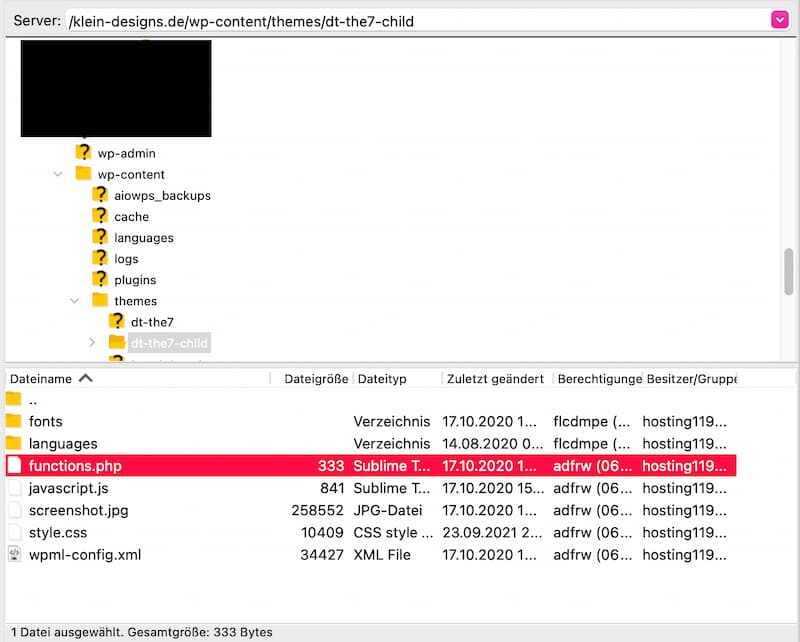
Step 2: Edit functions.php and add the code
Copy the following code from Crunchify and add it to the end of your functions.php.
`php
/
- © crunchify.com - 28 June 2021
*/
function crunchify_gravatar_alt($crunchifyGravatar) {
if (have_comments()) {
$alt = get_comment_author();
} else {
$alt = get_the_author_meta('display_name');
}
$crunchifyGravatar = str_replace(
"alt=''",
"alt='Avatar for " . $alt . "' title='Gravatar for " . $alt . "'",
$crunchifyGravatar
);
return $crunchifyGravatar;
}
add_filter('get_avatar', 'crunchify_gravatar_alt');
`
Step 3: Clear the cache and enjoy
In most cases, the changes take effect immediately.
If the Gravatars still appear without an alt attribute, this is usually caused by an active cache. Clear your WordPress cache plugin's cache and reload the page.
After that, the Gravatar images should include the correct alt text, and the SEO warning should disappear.
Conclusion
Even if a page doesn't use any of its own images, external or automatically generated content like Gravatar images can still trigger SEO warnings. A small snippet in functions.php fixes the problem quickly and permanently.
Thanks to Crunchify for the handy code snippet.